No records.
C#でImportMapTagHelperクラスを作ってJavaScriptのimport構文のキャッシュを管理する
ASP.NETでのTypeScriptファイル
WEBアプリでJavaScriptのキャッシュを管理する方法としてクエリ文字列を使った方法があります。
<script type="module" src="/js/App.js?v=1.0.7.54"></script>
実際には変数にバージョン番号を入れて以下のように書けます。
@{
    var version = "1.0.7.54";
}
<script type="module" src="/js/App.js?v=@version"></script>
TypeScriptファイルなどでは違うファイルを使用する場合に以下のように記述します。
import { $, HtmlElementQuery } from "../HigLabo/HtmlElementQuery.js";
キャッシュのバージョン番号を付記することでキャッシュの更新を強制させることが可能です。
import { $, HtmlElementQuery } from "../HigLabo/HtmlElementQuery.js?v=1.0.7.54";
import { $, HtmlElementQuery } from "../HigLabo/ItemGroup.js?v=1.0.7.54";
---(略:他の複数のファイル)---
しかしながら.tsファイル内ではC#の変数が使用できません。バージョン番号を更新したい場合、いくつもあるTypeScriptファイルのimport部分を置換処理で更新する必要があり、保守性が高くありません。
Import map
import mapを使用することでimport構文のマッピングを定義することができます。以下のように書きます。
<script type=importmap">
{
    "imports": {
        "/js/Htmx.js": "/js/Htmx.js?v=1.0.7.54",
        "/HigLabo/HtmlElementQuery.js": "/HigLabo/HtmlElementQuery.js?v=1.0.7.54",
        ...略
}
</script>
.cshtml内に記述するので以下のようにC#の変数を利用できます。
@{
    var version = "1.0.7.54";
}
<script type=importmap">
{
    "imports": {
        "/js/Htmx.js": "/js/Htmx.js?v=@version",
        "/HigLabo/HtmlElementQuery.js": "/HigLabo/HtmlElementQuery.js?v=@version",
        ...略
}
</script>
<script type="module" src="/js/App.js?v=@version"></script>
import mapはApp.jsの前に定義しておく必要があります。そうすることでApp.js内に書かれている
import { $, HtmlElementQuery } from "../HigLabo/HtmlElementQuery.js";
のfromの後ろの相対パスがまずは/js/HigLabo/HtmlElementQuery.jsに変換され、その値がimport mapに定義されているのでさらに以下に変換されます。
import { $, HtmlElementQuery } from "../HigLabo/HtmlElementQuery.js?v=1.0.7.54";
実際に開発者ツールでネットワーク通信を見てみるとクエリ文字列がついているのが確認できます。
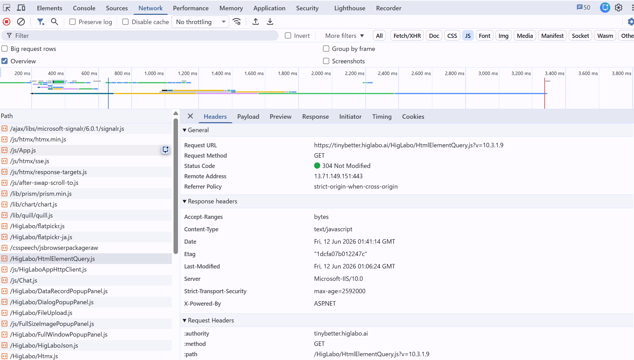
ImportMapTagHelperを定義する
特定のフォルダ内に存在する全ての.jsファイルのマッピングのHTMLを書くのは面倒です。簡単にこのHTMLが生成されるTagHelperを作ります。
using Microsoft.AspNetCore.Razor.TagHelpers;
using System.Text.Json;

namespace HigLabo.Web.TagHelpers;

public class ImportMapPathList
{
    private readonly Dictionary<string, string> _pathDictionary = new();

    public IReadOnlyDictionary<string, string> PathDictionary => this._pathDictionary;

    public void AddImportsPath(string key, string value)
    {
        if (key.IsNullOrEmpty() || value.IsNullOrEmpty()) { return; }

        this._pathDictionary[key] = value;
    }

    public void AddImportsPathFromDirectory(string physicalDirectoryPath, string requestPathPrefix, Func<string, string> convertValue)
    {
        if (Directory.Exists(physicalDirectoryPath) == false) { return; }

        var prefix = requestPathPrefix.TrimEnd('/');
        foreach (var filePath in Directory.GetFiles(physicalDirectoryPath, "*.js", SearchOption.AllDirectories))
        {
            var relativePath = Path.GetRelativePath(physicalDirectoryPath, filePath).Replace('\\', '/');
            var key = $"{prefix}/{relativePath}";
            this.AddImportsPath(key, convertValue(key));
        }
    }
}

[HtmlTargetElement("import-map")]
public class ImportMapTagHelper : TagHelper
{
    public ImportMapPathList PathList { get; set; } = new();

    public void AddImportsPath(string key, string value)
    {
        this.PathList.AddImportsPath(key, value);
    }

    public void AddImportsPathFromDirectory(string physicalDirectoryPath, string requestPathPrefix, Func<string, string> convertValue)
    {
        this.PathList.AddImportsPathFromDirectory(physicalDirectoryPath, requestPathPrefix, convertValue);
    }

    public override Task ProcessAsync(TagHelperContext context, TagHelperOutput output)
    {
        output.TagName = "script";
        output.TagMode = TagMode.StartTagAndEndTag;
        output.Attributes.SetAttribute("type", "importmap");

        var json = JsonSerializer.Serialize(new
        {
            imports = this.PathList.PathDictionary,
        });
        output.Content.SetHtmlContent(json);

        return base.ProcessAsync(context, output);
    }
}
このクラスを使うには以下のように物理フォルダとマッピングのルールを指定するだけです。
@using HigLabo.Web.TagHelpers;
@inject HigLaboAppHttpContext context
@inject Microsoft.AspNetCore.Hosting.IWebHostEnvironment WebHostEnvironment
@{
    var version = "1.0.7.54";
    var importMapPathList = new ImportMapPathList();
    importMapPathList.AddImportsPathFromDirectory(Path.Combine(WebHostEnvironment.WebRootPath, "js"), "/js",
        path => $"{path}?v={version}");
    importMapPathList.AddImportsPathFromDirectory(Path.Combine(WebHostEnvironment.WebRootPath, "HigLabo"), "/HigLabo",
        path => $"{path}?v=10.3.1.9");
}
<import-map path-list="@importMapPathList"></import-map>
<script type="module" src="/js/App.js?v=@version"></script>
全ての.jsファイルのマッピングが定義されたHTMLが生成されるようになります。
<script type="importmap">
{
   "imports":{
      "/js/after-swap-scroll-to.js":"/js/after-swap-scroll-to.js?v=1.0.7.54",
      "/js/AgentVoicePanel.js":"/js/AgentVoicePanel.js?v=1.0.7.54",
      "/js/App.js":"/js/App.js?v=1.0.7.54",
      "/js/Blog.js":"/js/Blog.js?v=1.0.7.54",
      "/js/CanvasSoundWave.js":"/js/CanvasSoundWave.js?v=1.0.7.54",
      "/js/Chart.js":"/js/Chart.js?v=1.0.7.54",
      =========(略)==========
      "/HigLabo/Popup.js":"/HigLabo/Popup.js?v=10.3.1.9",
      "/HigLabo/RecordListComponent.js":"/HigLabo/RecordListComponent.js?v=10.3.1.9",
      "/HigLabo/ServerClass.js":"/HigLabo/ServerClass.js?v=10.3.1.9",
      "/HigLabo/Textbox.js":"/HigLabo/Textbox.js?v=10.3.1.9"
   }
}
</script>
ASP.NETでのTypeScriptファイル
Import map
ImportMapTagHelperを定義する