 HigLabo
DbSharpApplication (Data access C# code generator for stored procedure)
Feature summary
DbSharpApplication is a tool that generate C# source code. It generates a StoredProcedure client class that enables you to call stored procedure easily.

DbSharpApplication support all data types on SQL server and MySql.
DbSharpApplication also support table value parameter of SQL server.
var sp = new Usp_Structure();
sp.BigIntColumn = 1;
//User defined table type parameter. TVP(table value parameter)
var r = new MyTableType.Record();
r.BigIntColumn = 2;
sp.StructuredColumn.Records.Add(r);
var spResult = await sp.ExecuteNonQueryAsync();

var sp1 = new Usp_SelectMultiTable();
var resultSetList = await sp1.GetResultSetsListAsync();
foreach (var item in resultSetList.ResultSetList)
{
    //Do something...
    var text = item.CharColumn;
    Console.WriteLine(item.BigIntColumn);
}
Table of contents
・How to Use DbSharp?
・Test First Development
・Single Responsibility Principle
・StringBuilder vs TextWriter
・Design StoredProcedure Class
・Read Schema from Database (including SqlGeometry,SqlGeography,HierarchyId)
・Enum Support
・UserDefinedType
・Async
・Multi ResultSet
・Get Schema from Database
・Indentity, RowGuid, Timestamp Column
・Deep Dive to DatabaseContext and Database Class
・Advanced Usage
・Conclusion
・History
Download DbSharpApplication?
You can download DbSharpApplication from the link below:
https://github.com/higty/higlabo/releases
Sample code:
https://github.com/higty/higlabo/tree/master/Net9/HigLabo.DbSharp.Sample
How to use DbSharpApplication?
Download zip file. You can see DbSharpApplication.exe. Launch DbSharpApplication by click it.
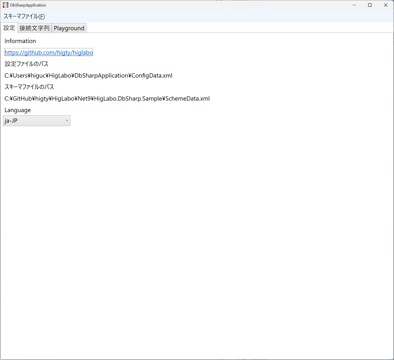
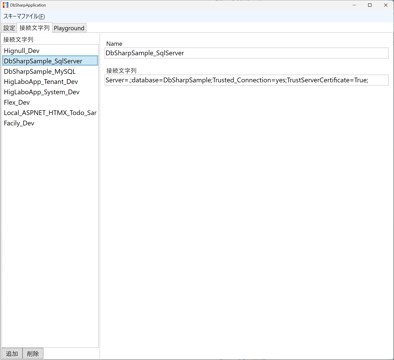
Select Connection string tab, you can add connection list from Add button on bottom. Set name of your connection.
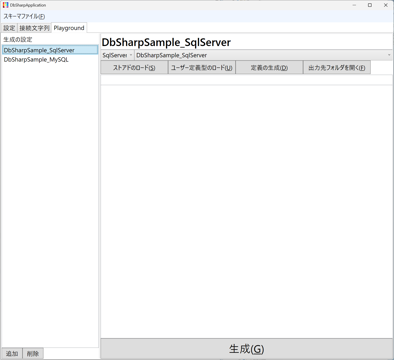
Next, click Playground tab and add new settings by clicking add button on bottom.Now you can select connection string from dropdown list.
Click Load stored procedure button. Now you can see stored procedure list on your database.
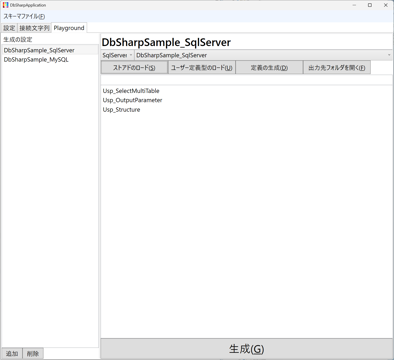
Select Usp_OutputParameter stored procedure from list and press Generate button in bottom.
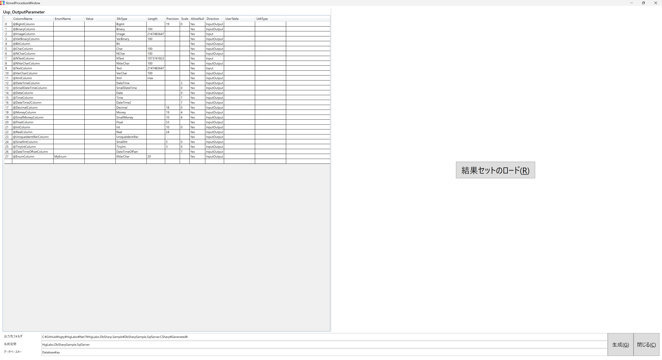
Set output folder, namespace, database key. Press Generate button. C# source code will be generated to specified folder.
To compile project, you must add reference of these.
HigLabo.Core
HigLabo.Data
HigLabo.Data.SqlServer
HigLabo.DbSharp
HigLabo.DbSharp.SqlServer
Now, you can compile the project.
I created a sample project on GitHub.
https://github.com/higty/higlabo/tree/master/Net8/HigLabo.DbSharp.Sample
Stored procedure with result sets
If stored procedure has resultsets, you can generate stored procedure C# class with result set class. Select Usp_SelectMultiTable stored procedure from list and press Generate button in bottom. Next, please press "Load result set" button on right side.
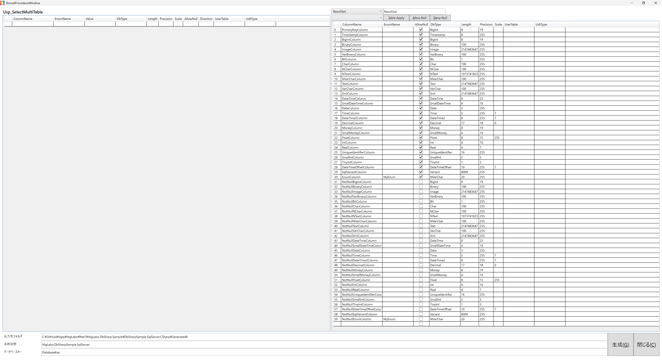
You can set AllowNull column of result set. If you want to use Enum as a property, please use EnumName. I set MyEnum to EnumColumn.
How to Use the Class
Set up DatabaseFactory class. If you set Database key "HigLabo", you pass "HigLabo" to the first parameter.
StoredProcedure.DatabaseFactory.SetCreateDatabaseMethod
    ("HigLabo", () => new SqlServerDatabase("My connection string..."));
Now, you can easily call stored procedure with user defined table type.
var sp = new Usp_Structure();
sp.BigIntColumn = 1;
//User defined table type parameter. TVP(table value parameter)
var r = new MyTableType.Record();
r.BigIntColumn = 2;
sp.StructuredColumn.Records.Add(r);
var spResult = await sp.ExecuteNonQueryAsync();
You can get result set.
var sp1 = new Usp_SelectMultiTable();
var resultSetList = await sp1.GetResultSetsListAsync();
foreach (var item in resultSetList.ResultSetList)
{
    //Do something...
    var text = item.CharColumn;
    Console.WriteLine(item.BigIntColumn);
}
You can see the sample code at the link below: